gh-manager-cli
$
> Clean up your GitHub account in 5 minutes

gh-manager-cli: The Terminal GitHub Manager for Repository Management

GitHub manager terminal interface. Archive, delete, bulk-select, and transfer repos with this CLI tool.
The TUI GitHub management solution developers love — manage GitHub from the terminal.
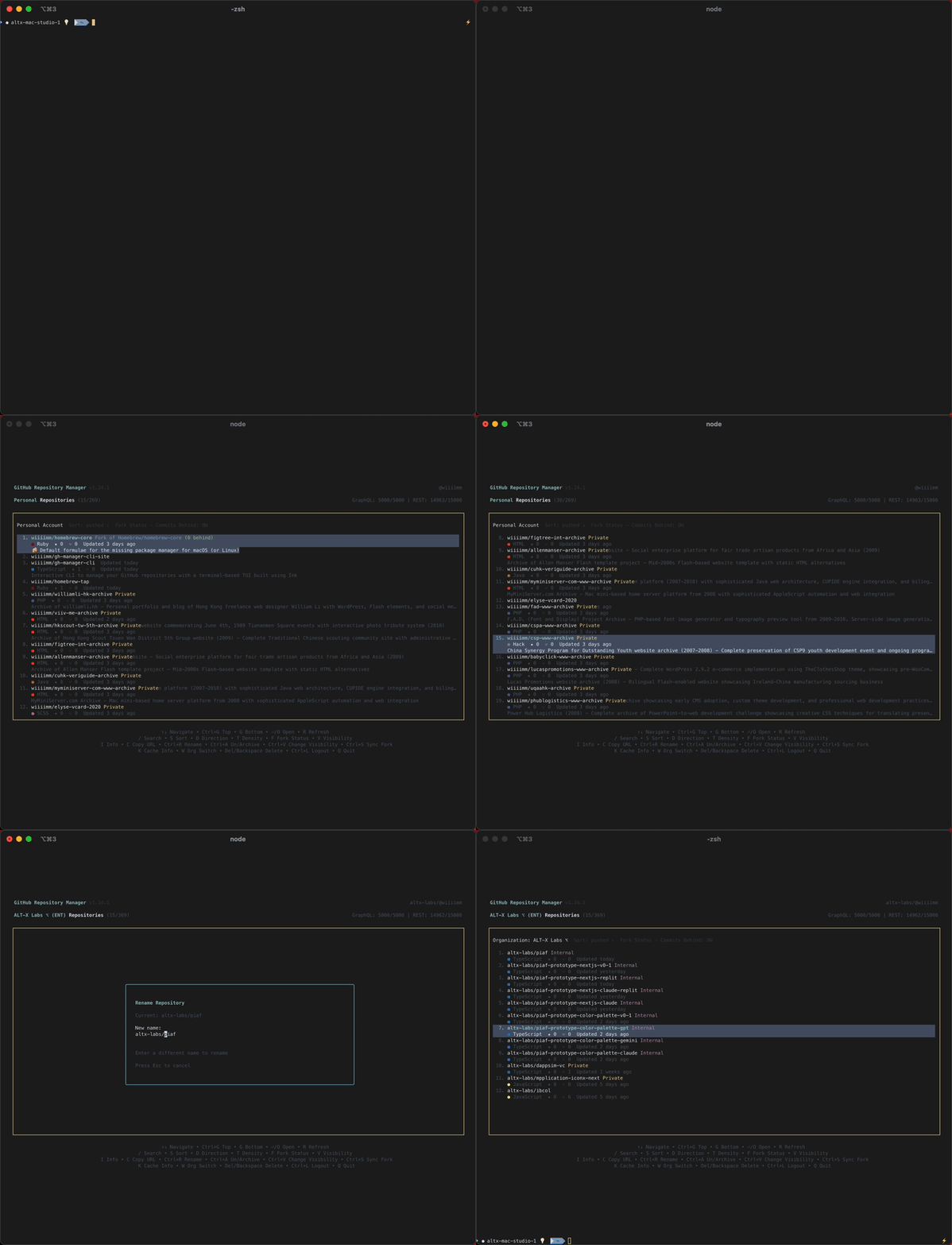
gh-manager-cli demo preview
Click to play full demo

Interactive demo showing repository browsing, search, and management features

Powerful Repository Management

Everything you need to manage GitHub repos efficiently

Smart Search & Filter
Server-side search plus instant fuzzy search (/) across your full cached account — find any repo in milliseconds
Keyboard-First Navigation
Full keyboard control with arrow keys, shortcuts, and modal-based interactions
Secure Authentication
GitHub OAuth or Personal Access Token with secure local storage
Repository Actions
Rename, archive, delete, change visibility, transfer to another owner/org, and sync forks — all with confirmation prompts
Stars Management
View and manage starred repositories with dedicated stars mode and quick star/unstar actions
Visibility Management
Filter by visibility and change repository settings including Enterprise support
Fork Tracking & Sync
Ahead/behind commit counts, jump to upstream (P), and one-key fork sync (Ctrl+F) with conflict detection
Rate Limit Monitoring
Real-time GraphQL & REST API usage with visual warnings and automatic delta tracking
Live Repository Metrics
Stars, forks, language stats, size tracking, and last activity timestamps
Enterprise & Org Support
Seamlessly switch between personal and organization contexts with enterprise badges
Persistent Preferences
UI settings, sort order, density, and filters saved between sessions
Display Density Control
Toggle between compact, cozy, and comfy modes for optimal information density
Smart Caching & Performance
Background fetch caches your entire account after the first page load — enabling instant fuzzy search and bulk operations across all repos
Bulk Select Mode
Press B to enter Bulk Select — multi-pick repos across pages and searches, then star/unstar, archive, change visibility, delete, or transfer them all at once. Two-stage confirmation with a review list and verification code for destructive actions.
Repository Transfer
Move a repo to another owner or organisation with Shift+M. A destination picker lists your personal account and all connected orgs, with a manual-entry fallback. Supports single and bulk transfer, both verification-code gated.
Repository Creation
Create a new repository without leaving the terminal — press Ctrl+N to open the creation form with name, description, visibility, and initialisation options
Colour Themes
Cycle through four built-in colour themes with Shift+T: Default, Ocean, Forest, and Monochrome — your preference is saved between sessions
Session Usage Summary
On quit, see a summary of everything you did this session — repos actioned, time spent, and an estimated time saved versus doing the same work in the GitHub web UI
> The Problem

Stop Clicking Through GitHub's Slow Web Interface

Managing repositories on github.com is painfully slow. Every action requires multiple clicks, page loads, and digging through settings menus. With dozens or hundreds of repos, it's a nightmare.

GitHub.com Problems
  • 20 repos per page, endless "Next" clicking
  • Click repo → Settings → scroll → find action
  • No bulk operations — archive, delete, or transfer one at a time
  • Full page refresh after every action
  • Can't filter by last activity or fork status
  • No keyboard shortcuts for power users
gh-manager-cli Solution
  • View all repos with smooth infinite scroll
  • Single keypress for any action — including repo creation and transfer
  • Bulk Select mode — star, archive, delete, or transfer many repos at once
  • Instant updates with no page reload
  • Smart filters by date, size, fork status
  • Full keyboard control for everything

Result: Clean up 50+ repos in 5 minutes instead of an hour of clicking

> Account Organization

Finally Clean Up Your GitHub Account

Tired of scrolling through hundreds of repos? Old forks cluttering your profile? Dead projects you forgot about? Take control and organize your GitHub presence.

Bulk Repository Management
  • B — enter Bulk Select mode, pick repos across pages and searches
  • Bulk archive, delete, star/unstar, and change visibility in one go
  • Bulk transfer repos to another owner or organisation (Shift+M)
  • Two-stage confirmation: review list, count prompt, and verification code for destructive actions
  • Manage starred repositories with dedicated stars mode
Smart Filtering & Discovery
  • / — fuzzy search across your full cached account instantly
  • Find inactive repos by last commit date
  • Filter by stars, size, language, and activity
  • Identify forks that are behind upstream with ahead/behind counts

Transform Your GitHub Profile

From chaotic repository list to organized, professional profile. Show potential employers and collaborators only your best work.

5 min
Average cleanup time
50+
Repos managed per session
100%
Terminal-based efficiency
> Keyboard Reference

Everything at Your Fingertips

Full keyboard control — no mouse required. Every action is one or two keystrokes away.

Navigation
  • ↑ / ↓Navigate repos
  • PgUp / PgDnJump 10 repos
  • Ctrl+G / GTop / bottom of list
  • Enter or OOpen in browser (forks: chooser)
  • EscClose modal / clear search
Search & Display
  • /Fuzzy search (full account cache)
  • S / DSort field / direction
  • VView filters (visibility · archive · fork)
  • TDensity: compact / cozy / comfy
  • Shift+TCycle colour theme
  • Shift+SToggle starred repos mode
  • RRefresh repo list
Quick Actions
  • Ctrl+AArchive / unarchive
  • Del / BackspaceDelete (with confirmation)
  • Ctrl+VChange visibility
  • Ctrl+SStar / unstar
  • Ctrl+RRename
  • Ctrl+NCreate new repository
  • Shift+MTransfer to another owner/org
  • CCopy repo URL (SSH/HTTPS)
Bulk Select Mode
  • BToggle Bulk Select mode
  • SpaceSelect / deselect repo
  • XUnselect all
  • Ctrl+ABulk archive / unarchive
  • Del / BackspaceBulk delete
  • Ctrl+SBulk star / unstar
  • Ctrl+VBulk change visibility
  • Shift+MBulk transfer
  • EscExit Bulk Select mode
Forks & Repo Info
  • PJump to upstream repo
  • Ctrl+FSync fork with upstream
  • IRepository info
  • LOpen PRs / Issues
  • KInspect cache status
Account & Session
  • WSwitch context (personal / org)
  • Ctrl+LLog out / switch account
  • QQuit (with session summary)

Multiple Installation Options

Choose the method that works best for you

NPX (Recommended)
Run instantly without installation
npx gh-manager-cli@latest
Homebrew
For macOS and Linux users
brew tap wiiiimm/tap
brew install gh-manager-cli
Global Install
Install globally via npm
npm install -g gh-manager-cli@latest
Pre-built Binaries
No Node.js required

Download standalone executables for Linux, macOS, and Windows from GitHub Releases

Simple Workflow

Get started in seconds

1

Run the command

npx gh-manager-cli@latest
2

Authenticate with GitHub

Choose OAuth (recommended) or Personal Access Token

3

Manage your repositories

Browse, search, sort, and perform actions on your GitHub repos

Start cleaning up your GitHub account now

Join thousands of developers who have organized their GitHub profiles with gh-manager-cli

Terminal TUI
npx gh-manager-cli@latest

💚 Thank You for Using gh-manager-cli!

If this app saved you time, please consider supporting the development of more open-source projects like this.

Hi, I'm William — the person behind wiiiimm, my new brand that brings together my worlds as a software engineer, photographer, and multimedia designer.

Two Decades of Code

I've been coding since 1998 and working on web projects since 2005 — over two decades of creating, launching, and collaborating. Along the way, I've worked with multiple agencies and helped bring countless projects to life.

Your sponsorship is an invitation to join the journey. Together, we can keep experimenting, building, and creating tools, images, and experiences worth sharing.

Your support and contributions make a difference! 🙏

Every contribution helps maintain and improve gh-manager-cli and future open-source projects.
